
', 'https%3A%2F%2Ffrumcare.com%2Fstore%2Flego-boost-creative-toolbox-17101-fun-robot-building-set-and-educational-coding-kit-for-kids-award-winning-stem-learning-toy-847-pieces%2F'))
LEGO Boost Creative Toolbox 17101 Fun Robot Building Set and Educational Coding Kit for Kids, Award-Winning STEM Learning Toy (847 Pieces)
Inspire kids to bring their LEGO creations to life with the new LEGO BOOST Creative Toolbox, the fun and easy entry to building and coding smart toys for boys and girls aged 7+. By downloading the free LEGO Boost app and following the step-by-step instructions, kids can learn how to master programming robots all by
Categories: Building Toys
$159.95Amazon.com Price
(as of November 10, 2018 1:22 pm GMT+0000 - Details)
Added on: November 10, 2018 - More: Comments & Reviews
Product Description
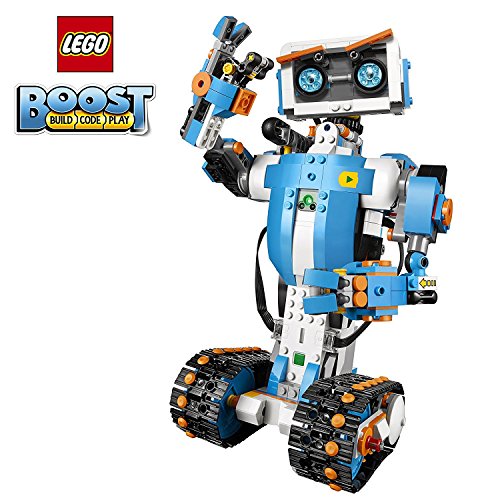
Inspire kids to bring their LEGO creations to life with the new LEGO BOOST Creative Toolbox, the fun and easy entry to building and coding smart toys for boys and girls aged 7+. By downloading the free LEGO Boost app and following the step-by-step instructions, kids can learn how to master programming robots all by themselves. Inside are instructions for Vernie the Robot—a moving, talking, and dancing robot, the M.T.R.4 (Multi-Tooled Rover 4)—a robust, versatile rover with 4 different tool attachments including a spring-loaded shooter, the Guitar4000—a musical instrument with pitch bend and sound effects, Frankie the Cat—an interactive pet that plays, purrs, and expresses its mood, and the AutoBuilder—an automated production line that actually builds miniature LEGO models! With the app’s intuitive, icon-based coding interface and complete array of exciting activities designed for each model, kids can learn about loops and variables, develop their STEM skills, creatively solve problems in endless play possibilities!
Product Features
- Who doesn’t love robots? Introduce kids to the creative world of coding with the best educational STEM toys to foster their curiosities. Building, learning, and programming robots has never been more fun!
- Includes 847 LEGO pieces that kids can build and rebuild into 5 cool multifunctional models. The best and most popular robotics toys for 7-12 year old boys and girls who love to tinker and learn about science. Use the latest tech like color, distance and tilt sensors.
- Construct and code Vernie the Robot to dance, rock out on the Guitar4000, foster Frankie the Cat, interact with the Autobuilder, or explore a new discovery with the M.T.R.4 (Multi-Tooled Rover 4). The IQ-boosting activities are endless!
- Award-winning toy and the perfect gift for kids and teenagers. Instructions for all 5 models are included with the free LEGO BOOST app. Download in the Amazon Appstore: amazon.com/dp/B075LL7KGB. Requires 6x AAA 1.5V batteries (not included).
- Vernie the Robot stands over 10″ (27cm) tall, Guitar4000 over 1″ (5cm) high, 16″ (42cm) long and 5″ (15cm) wide, Frankie the Cat over 6″ (17cm) tall, AutoBuilder over 10″ (27cm) high, M.T.R.4 over 4″ (12cm) high, 9″ (23cm) long and 5″ (14cm) wide.
- A tablet or mobile phone is required, but not included. Compatible with selected iOS, Android, Kindle and Windows 10 devices with BLE 4.1 and newer. Compatible with select mobile devices.
- Kids can combine their kit with LEGO City 60194 Arctic Scout Truck or LEGO NINJAGO 70652 Stormbringer and use the LEGO BOOST app to control their own original electronic creations.
Write a comment
Lysol Disinfectant Spray, Crisp Linen, 38oz (2X19oz)... [Read More]

Clorox Disinfecting Wipes Variety Pack – 5 Pack, 390 C... [Read More]

OasisSpace Upright Walker – Tall Walker with 10″... [Read More]

Sumind 30 Pack Slingshot Chicken Rubber Chicken Flick Chicke... [Read More]

BEYOUR WALKER Upright Rollator Walker Euro Style Stand Up Wa... [Read More]

5 Pack: Big Boys Youth Clothing Knit Mesh Active Athletic Pe... [Read More]

The Children’s Place Big Boys’ Bootcut Jeans, Du... [Read More]

Levi’s Boys’ Big 514 Straight Fit Jeans, Covered... [Read More]

The Children’s Place Big Boys’ Pull-on Cargo Sho... [Read More]

Creativity for Kids Glow In The Dark Rock Painting Kit ̵... [Read More]

This *is* the robot you’ve been looking for OVERALL CONCLUSION==================LEGO boost is 80% of the learning at 50% of the cost and 20% of the hassle of LEGOâs fancier Mindstorms product. LEGO Boost compares really well to all other competing robots out there, so if you want your kid to know about coding, robotics, mechanics or technology, itâs a really easy choice. The age range is spot-on: 7 to 12 years old seems just right.TOP PROS: 1) Great value for what you get; 2) Extensive models for a lot of fun; 3)…
Fun and educational, but with some kinks. I’m giving it 3 stars (upgraded to 4) for the concept (and positive feedback from Lego). My kid (7) loves it and it is a great introduction to robotics and programming. The app is well presented given the vast set of capabilities. They did a good job forcing you to take a gradual approach to learning by “unlocking” capabilities as you learn them. That said, there are two issues that others have reported as well. The product is so new that there is no help available with a google search…
Run on Kindle Fire HD 8 Kids Edition! – How To – How to: Run on Kindle Fire HD 8 Kids EditionI bought a brand new 7th generation – 2017 release, just to run the Lego Boost.(All-New Fire HD 8 Kids Edition Tablet, 8″ HD Display, 32 GB, Kid-Proof Case)Lego Boost, How to set it up & Works great!Step 1. Register and update all Kindle Patches to latest (takes a few reboots)Step 2. Sideload Google Play Store (search how on google, no hacking required)Step 3. Download official Lego Boost App from Google…