
)
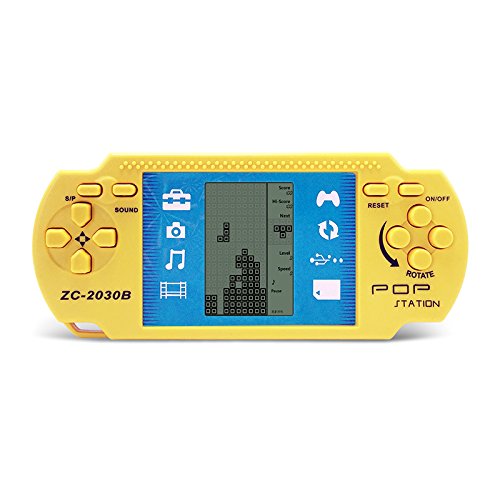
JXD Yellow Retro Portable Tetris Handheld Built-in 23 Games Tetris Kids Electronic Brick Games
Function Key Instructions 1.ON/OFF : Press ON/OFF Key to Turn ON or OFF the Game. 2. ROTATE: Press ROTATE Key to Select Games Before to Start,It Takes Action in the Selected Game. 3. SOUND :Press Sound Key Repeating to Select Sound Volume Level. 4. S/P (Start/Pause) :Press S/P Key Repeating to Start or Pause the Selected Game .
Categories: Kids Electronics
$7.99Amazon.com Price
(as of June 27, 2018 9:15 am GMT+0000 - Details)
Added on: November 11, 2017 - More: Comments & Reviews
Product Description
Function Key Instructions
1.ON/OFF : Press ON/OFF Key to Turn ON or OFF the Game.
2. ROTATE: Press ROTATE Key to Select Games Before to Start,It Takes Action in the Selected Game.
3. SOUND :Press Sound Key Repeating to Select Sound Volume Level.
4. S/P (Start/Pause) :Press S/P Key Repeating to Start or Pause the Selected Game .
5.RESET:Press RESET to Reset the Whole Unit System.
6. UP/DOWN:Press UP/DOWN Keys to Select the Pattern of the Selected Game Before to Start It.Press UP/DOWN Keys to Control UP/Down Direction in a Selected Game.
7. LEFT/ RIGHT: Press LEFT / RIGHT Keys to Select the Level(LEFT) and the Speed(RIGHT) of the Selected Game Before to Start it.Press UP/DOWN Keys to Control the Left/Right Direction in a Selected Game.
Game List and Operation
Built-in 23 Games:
01.Classic Tetris:LEFT / RIGHT Key Control Direction, ROTATE Key to Deformation.
02-08.Other Tetris:LEFT / RIGHT Key Control Direction, ROTATE Key to Deformation.
09.Tanks War:UP/DOWN/LEFT/RIGHT Key Control Direction, ROTATE Key to Launch Bullets.
10.Racing Game:LEFT / RIGHT Key Control Direction, ROTATE Key to Accelerate.
11.Pinbal:LEFT / RIGHT Key Control Direction, ROTATE to Speed up the Ball Movement Speedl.
12.Shooting:LEFT / RIGHT Key Control Direction, ROTATE Key Launch Bullets.
13.Obstacles Pinball:LEFT / RIGHT Key Control Direction, ROTATE to Speed up the Ball Movement Speedl.
14-15.Fill Shooting:LEFT / RIGHT Key Control Direction, ROTATE Key Fired Bullets.
16-23.Various Reverse Tetris:LEFT / RIGHT Key Control Direction, ROTATE Key to Deformation.
Product Features
- Requires 2×AAA Batteries. (Not included.)
- Kids’ Toys Educational Tetris Game Hand Held Electronic Toys Console
- Kids Childhood Educational Toys
- Built-in 23 Games
- Portable Tetris Console Bring a Nice Childhood
Write a comment
Lysol Disinfectant Spray, Crisp Linen, 38oz (2X19oz)... [Read More]

Clorox Disinfecting Wipes Variety Pack – 5 Pack, 390 C... [Read More]

OasisSpace Upright Walker – Tall Walker with 10″... [Read More]

Sumind 30 Pack Slingshot Chicken Rubber Chicken Flick Chicke... [Read More]

Party master Purple Shadow Freddy Bear Exclusive Collectible... [Read More]

5 Pack: Big Boys Youth Clothing Knit Mesh Active Athletic Pe... [Read More]

The Children’s Place Big Boys’ Bootcut Jeans, Du... [Read More]

Levi’s Boys’ Big 514 Straight Fit Jeans, Covered... [Read More]

The Children’s Place Big Boys’ Pull-on Cargo Sho... [Read More]

Creativity for Kids Glow In The Dark Rock Painting Kit ̵... [Read More]

Five Stars My daughter love it